
Connect your sources
Files remain in their original repositories. Provider credentials and OAuth grants determine what a connector can access.
Understand how StorageChain AI Connect protects connected knowledge, controls access, and supports your organization’s security review.
A practical starting point for IT, security and procurement teams. Review the controls together with your selected configuration and service agreement.
Security review contact: info@storagechain.io · Source: byoc.storagechain.io/security
Connect existing repositories without migrating original files. Choose the sources and supported indexing scopes that fit your organization.
Files remain in their original repositories. Provider credentials and OAuth grants determine what a connector can access.
Selected content is processed into text, metadata and vector embeddings, retained for search and retrieval.
Membership and configured source permissions determine accessible results and content.
Original files in your cloud does not mean zero data processing. Search retains a derived index. Connected AI tools can receive authorized content. Include index location, processing and AI provider retention in your data governance review.
Backend checks enforce organization membership, roles and configured source access. Owners and admins should review permissions when inviting people or connecting repositories.
| Role | Scope of access |
|---|---|
| Owner | Organization-wide access, with owner-only controls including customer-hosted search storage setup. |
| Admin | Broad organization and connection access to manage the workspace. |
| Member | Assigned connection permissions and configured folder or resource restrictions. |
Configure connections, buckets, folders or provider resources where supported.
Configure viewing, uploading, deleting and sharing permissions as needed.
MCP candidates receive additional membership, connection and file-scope checks.
Restrictions must be configured. Provider-side permission changes can depend on connector synchronization and provider checks. Do not assume all source changes propagate instantly.
Cloud access keys and OAuth access and refresh tokens are encrypted before database storage. Normal connection responses omit credential fields.
AES-256-GCM provides encryption with integrity protection.
Organization-scoped credentials use organization keys wrapped by a master key.
Server-side protection: the service must be able to decrypt authorized credentials to contact your providers. This credential encryption statement does not establish encryption at rest for every data store.
Account and session controls work alongside organization permissions. Turn on two-factor authentication for an additional layer at password sign-in.
Use a standard authenticator app and a six-digit code. Single-use backup codes are stored hashed; keep your copies somewhere safe.
Open security settingsPasswords use bcrypt. Reset tokens are hashed, expire after 10 minutes and are cleared after successful reset. Rate limits protect sign-in and recovery.
HttpOnly session cookies, production Secure defaults and CSRF protection for cookie-authenticated changes.
Content Security Policy, anti-framing controls, content-type sniffing protection and restricted browser permissions.
Authenticated, app-hosted PDF and Office preview components avoid the need for a public third-party viewer.
Search telemetry has field length limits and recognized credential pattern redaction. Query logs have configurable expiry with a 30-day default. Membership removal, restoration and folder-share changes retain actor and organization context.
MCP connector grants and API keys have their own authentication controls. Review them separately from password sign-in and 2FA.
Users sign in and approve a grant tied to a selected organization and read-only knowledge scope.
Configure permissions and optional expiration for each integration.
Review the connected AI provider too. Authorized search results and document content can be shared with an external AI service. Its handling, storage and retention terms apply alongside StorageChain access controls.
Where enabled, an organization owner can connect a customer-hosted search node. After activation, indexed text, metadata and vector embeddings use that infrastructure.
| Review area | Managed search storage | Customer-hosted search storage |
|---|---|---|
| Index location | Managed search infrastructure. | Your linked search node after activation. |
| Access path | Protected through the application. | Authenticated gateway over validated HTTPS/TLS. No direct browser-to-database connection. |
| Node availability | Managed search service availability. | Search reads and writes fail if the active node is unavailable; no silent switch back to managed storage. |
| Operations | Confirm deployment responsibilities during review. | You manage disks, network restrictions, server access, updates, monitoring and backups. |
| Data migration | Existing managed index remains until migration and removal are completed. | Connecting a node does not automatically migrate or delete the managed copy. |
Self-hosted search is not the entire service. Processing, authentication, other service data and temporary encrypted delivery buffers may still use StorageChain infrastructure. External AI tools can still receive authorized content. Migration and managed-copy removal are separate steps.
Use this page to identify relevant controls, then request current evidence and confirm how those controls apply to your deployment.
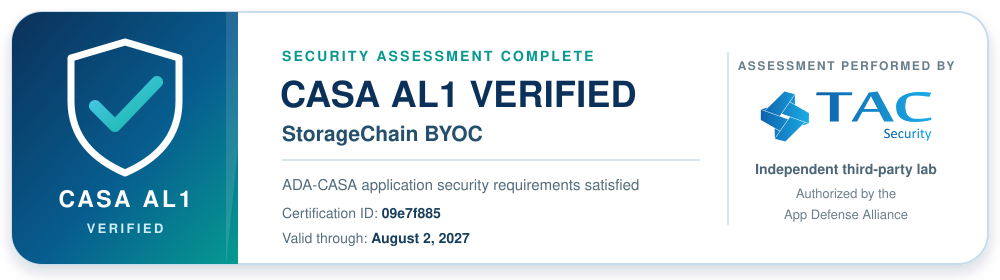
Cloud Application Security Assessment performed by TAC Security, an independent App Defense Alliance-authorized lab.
What this covers: the validation letter confirms the named application satisfied applicable ADA-CASA AL1 application security requirements. Its control areas include authentication, session management, access control, communications, data validation and configuration. At AL1, the developer provides evidence and compliance statements; the authorized lab reviews evidence or tests when applicable. Review the letter for the assessed scope and assurance level.
Send your questionnaire, assessment request or deployment questions. Our team can provide current materials and clarify their scope.
Assessment scope matters. The CASA AL1 validation applies to the named application and the scope described in the letter. Infrastructure-provider certifications have separate scopes. Review current documentation and your service agreement against your organization’s requirements.
If you suspect exposed credentials or unwanted access, restrict access promptly and gather the information needed for review.
6 questions
Stored credential fields are encrypted and omitted from normal connection responses. The backend decrypts them when needed for authorized provider operations. Encryption protects stored secrets; access controls govern who can use connected resources.
No. Original files remain in source repositories, but indexing and search process selected content and retain derived text, metadata and embeddings. External AI connectors can receive authorized results and document content. Customer-hosted search changes the index location, not necessarily all processing or service data.
StorageChain checks current application membership and configured access when serving protected resources, with additional authorization checks for MCP results. Provider-side changes can also depend on connector synchronization and provider checks. Review permissions and refresh connections when access changes; do not assume every source update is synchronized instantly.
Use one of the single-use backup codes issued during enrollment and keep remaining codes safe. Two-factor authentication protects password sign-in. API keys and connector tokens authenticate separately, so review their permissions, expiration and revocation independently.
Remove member or connection access, revoke unused API keys, and revoke provider credentials or OAuth grants at the source. Source revocation stops future use of that grant; it does not erase an existing search index or content already shared with AI tools. Account deletion is available in Settings. Contact StorageChain to clarify removal and retention requirements for your deployment.
StorageChain LLC completed a CASA AL1 application security assessment with TAC Security for the application storagechainbyoc498015. The validation letter lists certification ID 09e7f885, issued August 1, 2026 and valid through August 2, 2027. View the TAC Security validation letter (opens in new tab) and review its scope. Contact StorageChain for additional materials and deployment-specific controls. Infrastructure-provider certifications have separate scopes.
No matching questions. Try “permissions,” “credentials,” “2FA” or “AI,” or contact our team.
Get help with your configuration or security review.